Someone once said "If you want a toy, get an iPhone. If you want a tool, get a BlackBerry." Indeed it's like comparing apples and...not apples (pun intended). In this case, the BlackBerry does all I need it to and much much more. i don't want games on my phone. i don't want a fart button on my phone. i don't want to edit video on my phone. I have enjoyed video, & MMS on my phones for years, and have enjoyed copy & paste since getting my first BlackBerry in 2007. Here's a list of useful BlackBerry apps and their addresses:
BlackBerry App World (needed for Pandora, iHeartRadio, Trapster, QuickPull etc.)
Messenger Progs (official clients)
Flickr Client
---non-App World progs (might have been added since this post)
Google Maps / GPS Navigation tool
http://google.com/gmm
MidpSSH for BlackBerry / SSH console client
http://bbssh.org/ota/
Opera Mini / alternate browser (serverside processing)
Foursquare for BlackBerry
Grooveshark for BlackBerry
---Sites---
List of very useful non-standard mobile sites you never thought of
National Hurricane Center (track storms)
http://www.nhc.noaa.gov/mobile/
UPS (track UPS packages)
http://mobile.ups.com/ups/
FedEx (track FedEx packages)
https://fedex.com/mobi/
----
Finally for the nerds, a list of every phone i've owned (and learned inside out) in the last 10 years (as of next month)
RIM / BlackBerry Bold 9000 / GSM850,GSM900,GSM1800,GSM1900

After getting the 8830 (along with my 8GB MicroSD) stolen, rather than call in my last replacement, I used it as an excuse to switch to a GSM carrier. Shopped everywhere before finally settling on a Bold at Best Buy ($289 w/ contract, AT&T store wanted $499). Really just wanted a phone that could utilize a SIM card so that I could switch carriers whenever I wanted, both in the US OR in other countries. Worked like a charm in the Dominican Republic, showing me all the carriers I could choose from and choosing AT&T's counterpart ("viva") by default. (They had Viva, Orange, & Claro). Accepts up to 16GB MicroSD, superb media player, browser second only to the iPhone. No bluetooth FTP, but apparently thats by design so as to avoid security flaws inherent in Bluetooth. Amazing multitasking. Not uncommon for me to be running Pandora (into car stereo), texting someone, and tracking my whereabouts with Google Maps, all at the same time, without so much as a single wait symbol. Speakerphone excellent. Camera a little washed out but don't expect great pics, thats what Canon is for. Can't shut off corny "camera shutter" noise without nonfree app. Speaker is excellent, with discrete stereo coming from speakers pointing outward to the L & R sides. Faux leather back built in makes it easy to grip. People complain that its too big but makes it easier for me to type with chubby fingers. (After buying an iPod Touch, found out that i really prefer buttons to touchscreen...touch screen requires you to look b/c there's no tactile feedback).
_______________________________
RIM / BlackBerry World Edition 8830 / CDMA850,GSM900,GSM1800,CDMA1900 (US CDMA, EU GSM)

My mother left me this as a backup because she was going to toss it so when I got tired of the
Nextel dying and freezing I gave it a shot. Just when I happened to activate it they released a software update that apparently was years in the making (4.5?). Fell in LOVE. Had horrible RAM required-to-available ratio after the update, so it was constantly garbage collecting, but as long as I didn't run too much at once it was all good. NO CAMERA. Went to Ultra Music Festival, close to many many great artists, and had no phone camera. 50ft from The Prodigy and I couldn't take any pics. Full keyboard rocked my world.
_______________________________
Motorola / Deluxe ic902 / iDEN800,CDMA1900 (Hybrid Nextel/Sprint)

First Direct Connect phone. Direct Connect was pretty awesome except...barely anyone used it anymore by the time I got it. A Nextel phone that doesn't look like a doorstop so that was pretty cool. Had special bio-paint according to pamphlet inside box, to keep it from getting "smudgy-looking". A Nextel phone with removable memory, video camera, camera, etc. Had killer speakerphone (super loud, obviously because it already has that Direct Connect speaker). VERY buggy software-wise. Shame b/c the hardware seemed pretty badass to me. Huge color screen on the front. Only phone i've seen with a MicroSD slot in the door (receiever end of the clamshell) instead of the body. Horrible battery life.
_______________________________
Sanyo / SCP-8400 / CDMA850, CDMA1900

First phone with removable MicroSD card. Built-in phone number backup functionality was amazing. First bluetooth phone. Had PictBridge (print directly to printer via cable) but only used it once.
_______________________________
Sanyo / MM-7400 / AMPS850, CDMA850, CDMA1900 (last analog-capable phone)


My last analog-capable phone, I probably liked the feel of this one the best, with its contrast of metallic red faceplate-to-dark grey body. 70MB onboard memory. Had a feature where you could text a certain code to it and it would erase the phone. Had Sprint's prototype push-to-talk that didn't work all that well, tried it for a month with a friend. First video phone. Figured out that you could pause recording, and used it to make stop-motion videos (i.e. Robot Chicken) lol.
_______________________________
Sanyo / SCP-8200

This phone proved to me that Sanyo's may have shitty cameras but get excellent reception and furthermore, can take a beating. Got ripped in half on family vacation and kept on working. (had to plug in headset since receiver was gone). First speakerphone.
_______________________________
Sanyo / SCP-8100

My first camera phone. Pretty decent shots from this, including one of a UH-60 (Black Hawk) where the blades were spinning so fast they look curved because the CCD couldn't capture it fast enough.
_______________________________
Samsung / SPH-N400 / AMPS850, CDMA850, CDMA1900

First phone with a color screen. Froze a bit but pretty awesome bodystyle like the old one.
_______________________________
Samsung / SPH-N200 / AMPS850, CDMA1900

My first remotely cool-looking phone. Still monochrome screen. Wouldve been the MAN in 10th grade except no one at that age really cared about phones yet, especially compared to now.
_______________________________
Qualcomm / QCP-2760 / AMPS800, CDMA1900

First cell phone. Kicker: I was rockin AIM on this bitch. Yes, I know it was a 5-line LCD.
List of very useful non-standard mobile sites you never thought of
National Hurricane Center (track storms)
http://www.nhc.noaa.gov/mobile/
UPS (track UPS packages)
http://mobile.ups.com/ups/
FedEx (track FedEx packages)
https://fedex.com/mobi/
----
Finally for the nerds, a list of every phone i've owned (and learned inside out) in the last 10 years (as of next month)
RIM / BlackBerry Bold 9000 / GSM850,GSM900,GSM1800,GSM1900

After getting the 8830 (along with my 8GB MicroSD) stolen, rather than call in my last replacement, I used it as an excuse to switch to a GSM carrier. Shopped everywhere before finally settling on a Bold at Best Buy ($289 w/ contract, AT&T store wanted $499). Really just wanted a phone that could utilize a SIM card so that I could switch carriers whenever I wanted, both in the US OR in other countries. Worked like a charm in the Dominican Republic, showing me all the carriers I could choose from and choosing AT&T's counterpart ("viva") by default. (They had Viva, Orange, & Claro). Accepts up to 16GB MicroSD, superb media player, browser second only to the iPhone. No bluetooth FTP, but apparently thats by design so as to avoid security flaws inherent in Bluetooth. Amazing multitasking. Not uncommon for me to be running Pandora (into car stereo), texting someone, and tracking my whereabouts with Google Maps, all at the same time, without so much as a single wait symbol. Speakerphone excellent. Camera a little washed out but don't expect great pics, thats what Canon is for. Can't shut off corny "camera shutter" noise without nonfree app. Speaker is excellent, with discrete stereo coming from speakers pointing outward to the L & R sides. Faux leather back built in makes it easy to grip. People complain that its too big but makes it easier for me to type with chubby fingers. (After buying an iPod Touch, found out that i really prefer buttons to touchscreen...touch screen requires you to look b/c there's no tactile feedback).
_______________________________
RIM / BlackBerry World Edition 8830 / CDMA850,GSM900,GSM1800,CDMA1900 (US CDMA, EU GSM)
My mother left me this as a backup because she was going to toss it so when I got tired of the
Nextel dying and freezing I gave it a shot. Just when I happened to activate it they released a software update that apparently was years in the making (4.5?). Fell in LOVE. Had horrible RAM required-to-available ratio after the update, so it was constantly garbage collecting, but as long as I didn't run too much at once it was all good. NO CAMERA. Went to Ultra Music Festival, close to many many great artists, and had no phone camera. 50ft from The Prodigy and I couldn't take any pics. Full keyboard rocked my world.
_______________________________
Motorola / Deluxe ic902 / iDEN800,CDMA1900 (Hybrid Nextel/Sprint)

First Direct Connect phone. Direct Connect was pretty awesome except...barely anyone used it anymore by the time I got it. A Nextel phone that doesn't look like a doorstop so that was pretty cool. Had special bio-paint according to pamphlet inside box, to keep it from getting "smudgy-looking". A Nextel phone with removable memory, video camera, camera, etc. Had killer speakerphone (super loud, obviously because it already has that Direct Connect speaker). VERY buggy software-wise. Shame b/c the hardware seemed pretty badass to me. Huge color screen on the front. Only phone i've seen with a MicroSD slot in the door (receiever end of the clamshell) instead of the body. Horrible battery life.
_______________________________
Sanyo / SCP-8400 / CDMA850, CDMA1900

First phone with removable MicroSD card. Built-in phone number backup functionality was amazing. First bluetooth phone. Had PictBridge (print directly to printer via cable) but only used it once.
_______________________________
Sanyo / MM-7400 / AMPS850, CDMA850, CDMA1900 (last analog-capable phone)


My last analog-capable phone, I probably liked the feel of this one the best, with its contrast of metallic red faceplate-to-dark grey body. 70MB onboard memory. Had a feature where you could text a certain code to it and it would erase the phone. Had Sprint's prototype push-to-talk that didn't work all that well, tried it for a month with a friend. First video phone. Figured out that you could pause recording, and used it to make stop-motion videos (i.e. Robot Chicken) lol.
_______________________________
Sanyo / SCP-8200

This phone proved to me that Sanyo's may have shitty cameras but get excellent reception and furthermore, can take a beating. Got ripped in half on family vacation and kept on working. (had to plug in headset since receiver was gone). First speakerphone.
_______________________________
Sanyo / SCP-8100

My first camera phone. Pretty decent shots from this, including one of a UH-60 (Black Hawk) where the blades were spinning so fast they look curved because the CCD couldn't capture it fast enough.
_______________________________
Samsung / SPH-N400 / AMPS850, CDMA850, CDMA1900

First phone with a color screen. Froze a bit but pretty awesome bodystyle like the old one.
_______________________________
Samsung / SPH-N200 / AMPS850, CDMA1900
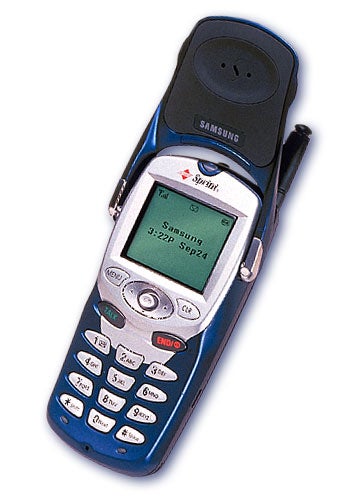
My first remotely cool-looking phone. Still monochrome screen. Wouldve been the MAN in 10th grade except no one at that age really cared about phones yet, especially compared to now.
_______________________________
Qualcomm / QCP-2760 / AMPS800, CDMA1900

First cell phone. Kicker: I was rockin AIM on this bitch. Yes, I know it was a 5-line LCD.
