Okay so after a more-than-fair 2 month evaluation of Android, using version 2.1 on the Samsung Captivate, I have to say that man do I ever miss my BlackBerry. I couldn't find any other perspectives like mine but I'm so sure of myself that I'll explain it here.
If you have a lot of things going on, and are constantly moving back and forth and talking to many people at once, and involved with many groups of people, Android can't hold a candle to the BlackBerry. On my BlackBerry Bold I'd be on BBM, playing Pandora through my car stereo, and using Google Maps to navigate, with nary a hitch. Email comes to you the second it's sent, and the entire device is centered around being, more or less, a 'super messenger'. Between 4 Email accounts, google chat, BBM, texts, and MMS, I was constantly a communications machine. Also, anyone who knows a lot of people can attest that at times you sort of become a gateway for people to reach other people. Even then, I was good to go.
The Captivate (Galaxy S) is a touchscreen only phone. Now, I gave touchscreens a go when I had an iPod Touch 2G a while ago and I didnt like it that much. 2 years later: nothing's changed. I will admit that Swype is pretty cool but it never picks the words I want to use.
BAD THINGS
---------------
* Email, Email, Email. On this phone, sometimes Sync doesnt work, sometimes its iffy, sometimes it works. In any case, theres a lot of really stupid notifications that get top priority in the Notification bar, but all your email just gets one notification.
* When you save an email attachment it just says 'saved'. Doesn't tell you where, doesn't give you the option to choose. You have to save it and then go find it later and move it.
* Contacts prefix's are ignored. i.e. my Army buddies might be a SGT John Smith, and you save it as their prefix, but in the phone book it doesn't show it. You'd think there'd be a setting to toggle it on at least, but there sadly is not.
* Limited language configuration without tweaking. There's no Greek!!! I'm of Greek heritage, plus I'm in two fraternities, and I'm an engineering student (greek letters are heavy in upper level math). So to not have it as an input option is absurd.
* When I switch to the other caller in a Call Waiting scenario, a dialog box actually pops up asking me if i want to hold the first person or end the first person. Why would you STOP me from switching over to ask me that...i dont feel like stopping to pull the phone away from my face and press some stuff i just want to talk to the other person, as soon as humanly possible. So fucking annoying.
* The ringer is not even loud compared to the BlackBerry's i've owned...
* No direct control over the cellular radio (only bluetooth and wifi). On any BB, I could turn the cell radio on and off at the touch of a button without some extra widget, and could control 2g/3g operation (3g is faster but murders your battery)
* GPS ...at the time of release, it didnt work on my Captivate for a full month.
* battery life is downright pathetic. Always have to plug my phone in all the time...makes you look incompetent. Especially if you forgot the charger.
* if you have a new text, it wont let me scroll through a different text until you read the new one (keeps 'blinking' at the top and resending me to the top). Annoying if you already read the txt thru the 'preview'
* When i go to send a MMS it shows me ALL contacts (including the ones on my SIM card) even though I told the phone not to show SIM contacts. It only hides SIM contacts in the default view.
* When I want to use the phone as Removable Media on the PC, I have to manually pull down the notification bar, click the notification, and then click MOUNT for it to actually connect to the computer. Unnecessary extra step that makes zero sense.
* No built-in way to manage multiple apps running and close specific apps. That in and of itself requires another app. This should be intrinsic to any operating system.
* Going running with music? Forget it. Sweat (any amount at all) greatly confuses the touchscreen. That and shaking it makes it pick another song, and there's no way to turn that off.
* If the phone is remotely low on battery life, the camera application won't allow you to take a picture. It shows the camera working below a dialog box telling you the battery's low, then closes the app.
* Can't make 'folders' for app icons to organize the apps the way you want
----
Good things about Android:
* TV/HDMI Out...really cool, actually.
* Tasker app is neat...u can make the phone do anything you set a condition for. Unprecedented levels of control. (i.e. from 9:58am to 9:59am shut off the screen and begin recording from the microphone and save it to folder x)
* The browser is amazing. Still no flash, but it's loads better than the BB5 browser (Opera Mini on BB helps alleviate the pain though)
* The AMOLED screen on the Captivate is to die for. The blacks/colors are really rich.
* The camera (although without flash) is really nice. Good for taking pictures of the board or of papers for class. Photo editing is amazing ON the phone.
* You can share multimedia content (like pictures, video, etc) through like 10 different ways
* Captivate can be soft-unlocked without any MSL code
* Scans media on the SD card extremely quickly compared to the blackberry
* The music player automatically saves the most recently added files, to any part of the filesystem (onboard or sd card) to a "Recently Added" playlist, so you can find the bluetooth received files, browser-downloaded files, or removable-media-copied files instantaneously
* Sexy formfactor...including usb port sliding door.
* A lot better for developing for than the BlackBerry
----------------
All in all I'd say if you're a geek that loves to tinker and play and have a bunch of friends, then the Galaxy S/Captivate is great. But as you can see, all the pluses I listed aren't really important things...they're more like fun 'extras'. All the crucial basics of the device are the ones that irritate someone who needs things fast and efficient. (Notice I didn't even list the touchscreen as a minus...because I know thats my personal fat-fingered dilemma and not a de-facto negative feature)
If you run time critical applications all the time, like a full time college student with a job, a student organization, and 2 fraternities, I'd much more recommend a Blackberry any day of the week.
01 October 2010

20 September 2010
livelist- iconic ass-kicking musical properties: guitar riffs of rock/instrumental loops of rap
ROCK
Beastie Boys - No Sleep Till Brooklyn
Rage Against the Machine - Sleep Now In The Fire
Ozzy Osbourne - Crazy Train
Black Sabbath - Iron Man
Metallica - Enter Sandman
AC/DC - Thunderstruck, T.N.T., Back In Black
javascript:void(0)
RAP
Notorious B.I.G. - Kick In The Door
Wu-Tang Clan - C.R.E.A.M.
Mobb Deep - Shook Ones Part II
Beastie Boys - No Sleep Till Brooklyn
Rage Against the Machine - Sleep Now In The Fire
Ozzy Osbourne - Crazy Train
Black Sabbath - Iron Man
Metallica - Enter Sandman
AC/DC - Thunderstruck, T.N.T., Back In Black
javascript:void(0)
RAP
Notorious B.I.G. - Kick In The Door
Wu-Tang Clan - C.R.E.A.M.
Mobb Deep - Shook Ones Part II
04 August 2010
Torn...for the next mobile
Okay so having my Bold 9000 knocked into a mudpit at one of my fraternity's raucous pool parties, I've been succeeding in getting it to work anyways, albeit not with all cylinders firing... keys not working entirely, etc etc. Finally it randomly finally cut off. I disassembled it, cleaned the contacts, reassembled it and got it to fire up one last time to back it up to my laptop, right there in the car (clutch!) before it never turned on again.
Surviving on a trusty unlocked HTC Wizard 200 (WinMo 6.5 giving me a flashback to PocketPC 2002 days on the iPaq 3630...my first PDA haha), I'm now forced to choose. One would think my obvious choice would be the newly announced (today!) BlackBerry Torch 9800 slider. HOWEVER, being a firm believer in Costanzaism (facebook search it), and seeking a development platform for an App to control my senior design robot remotely, I was looking at both the iPhone 4 (hey gotta give it a chance at least) and Android OS. Samsung just released a gorgeous AMOLED-screen-having Galaxy S across all platforms...Motorola announced they plan to have a 2GHz (!) Android smartphone out by the end of the year...with nVidia Tegra dedicated mobile graphics (!!) but being as I dont see Moto crankin' out too many (read: 0) non-Verizon handsets as of late, I'd either go with the Captivate (AT&T version of the Galaxy S) or wait for Google's next 'developer phone'.
The only things i really hate about the Android phones are, 1, i'm forced to put my contacts list on Google's server, and thus connect my gmail account to my phone. and 2. not many of them customarily have any keyboard, which is irritating because you cant really text under the table in lecture so well when theres no textile feedback. :/
The good things about it (as opposed to an iPhone), from a developer's perspective, is:
1. $25 for a dev account (Apple is $100)
2. Java syntax, no need to learn Objective-C (enough issues to work out for senior design as is)
3. Multiplatform IDE (iPhone requires XCode, which is Mac OS X only) (all my group members can work on it, not just the mac-owners)
4. True multitasking
But I'm not going to lie to you, its not as pretty as the iPhone's interface.
More to come.
Surviving on a trusty unlocked HTC Wizard 200 (WinMo 6.5 giving me a flashback to PocketPC 2002 days on the iPaq 3630...my first PDA haha), I'm now forced to choose. One would think my obvious choice would be the newly announced (today!) BlackBerry Torch 9800 slider. HOWEVER, being a firm believer in Costanzaism (facebook search it), and seeking a development platform for an App to control my senior design robot remotely, I was looking at both the iPhone 4 (hey gotta give it a chance at least) and Android OS. Samsung just released a gorgeous AMOLED-screen-having Galaxy S across all platforms...Motorola announced they plan to have a 2GHz (!) Android smartphone out by the end of the year...with nVidia Tegra dedicated mobile graphics (!!) but being as I dont see Moto crankin' out too many (read: 0) non-Verizon handsets as of late, I'd either go with the Captivate (AT&T version of the Galaxy S) or wait for Google's next 'developer phone'.
The only things i really hate about the Android phones are, 1, i'm forced to put my contacts list on Google's server, and thus connect my gmail account to my phone. and 2. not many of them customarily have any keyboard, which is irritating because you cant really text under the table in lecture so well when theres no textile feedback. :/
The good things about it (as opposed to an iPhone), from a developer's perspective, is:
1. $25 for a dev account (Apple is $100)
2. Java syntax, no need to learn Objective-C (enough issues to work out for senior design as is)
3. Multiplatform IDE (iPhone requires XCode, which is Mac OS X only) (all my group members can work on it, not just the mac-owners)
4. True multitasking
But I'm not going to lie to you, its not as pretty as the iPhone's interface.
More to come.
11 May 2010
Opinion: just for Hassan
So, people keep saying all around me "new iPad doesnt have Flash" "gotta have Flash" "what about Flash". Suffice to say, Steve Jobs wrote a letter & put it on the Apple website regarding Flash and their stance on stepping around it, and actually ripped Adobe a new one. It was like he had been saving up for a long time and finally just let them have it, its pretty amazing but he makes some good points, mainly toward what is considered "open" and what's "closed."
Apple has amazing clarity and vision toward the future, which puts them ahead of the competition constantly, and for that I'll give them credit. And while I'm not sure how the iPad's going to change everything, as I still very much enjoy keyboards over touchscreens any day, I will say that the next big step is going toward mobile devices that sip power and don't slurp it, and pick & choose how they handle processes, without delaying or going slow, and emit very little heat, compared to the machines of the past.
Adobe Flash does not fall in this vision. Its a general one-size-fits-all solution to run on everything. The problem is, when "everything" includes the small army of mobile devices that has already started to appear in peoples hands, Flash finds itself fading away because it really doesnt even run efficiently on some desktops. Yeah it helped by creating a way that anyone with a browser could watch video, but it decodes in SOFTWARE, which is unnecessary work for a computer thats got the gearing & fittings to do it in HARDWARE, saving both heat & energy. Furthermore, its incredibly unstable. Mr. Jobs talks about how its the leading cause of Mac OS X crashing, and I'll go one more and say that using it on Linux is a complete pain. First, they always leave Linux for last, throwing them a bone when they have to. Second, watching Flash video on Linux is the equivalent of making your computer go running for like 8 miles and then wondering why the battery dies, because if you're on a laptop, forget it. I had an old 700MHz ThinkPad and it could only play one Flash movie if nothing else was running, in Crunchbang (very minimal Linux distro). And the battery would last about 30min, and the battery was still good.
There's other reasons why Flash probably wont make it into the future, but these are the most outstanding IMHO, and Adobe should create something new instead of making people update their Acrobat 3,284 times for no reason or sitting on the CS Suite.
Favorite Running Songs...
There's always songs to run to but these are the ones that, over years, I always leave in the mp3 player because I never tire of them. SO, in no particular order:
Prodigy - Breathe
Rage Against the Machine - Sleep Now In the Fire
Cake - Never There (breakbeat mix) *
Bomfunk MCs - Uprocking Beats (Speed Garage Mix)
Metallica - Enter Sandman
The Prodigy - Outta Space (DJ Deekline Booty Space Mix)
Naughty by Nature - Uptown Anthem
*pretty hard to find, dont expect to see them on youtube
Theres LOTS of other songs I run to, usually House or Rock, or really fast rap, but these songs are a constant so I hope whoever reads this somewhat enjoys it
- X
04 February 2010
best characters
so in an effort to deviate from the usual technical BS, heres a list thats been in the back of my mind...
No matter how garbage the movie, most every time there's one side character that makes it bearable or even enjoyable to me. Here's the list
-----------

Dr. Cockroach: You must forgive my friend, but as you can see, he has no brain.
B.O.B.: Turns out, you don't need one. Totally overrated! I don't even have to...
[Starts gasping for air]
B.O.B.: I forgot how to breathe! Help me, Doctor Cockroach!
Dr. Cockroach: Suck in, B.O.B.
B.O.B.: [breathes normally] Thanks, Doc. You're a life saver.

Gimbel's Manager: Why you smilin' like that?
Buddy: I just like to smile, smiling's my favorite
Gimbel's Manager: Make work your favorite. That's your new favorite.

Ron Burgundy: Last time I looked in the dictionary, my name's Ron Burgundy. What's your name?
Brian Fantana: Brian Fantana.
Champ Kind: Champ Kind.
Brick Tamland: Brian Fantana.
Brian Fantana: No, you're Brick.
Brick Tamland: Brian.
Brian Fantana: I'm Brian.
Brick Tamland: Veronica.

Tuck: You fired!
Roll: You fired!
Tuck: You fireeeeeed!
Rosie: [in disgust] Oh, will you *shut up*?
Tuck: Hey!
Roll: You fired!

Dr. Nick: "Hi, everybody!"
Dr. Nick: "Hey, Mr. McGregg! If it isn't the man with a leg for an arm & an arm for a leg!"
No matter how garbage the movie, most every time there's one side character that makes it bearable or even enjoyable to me. Here's the list
-----------

Monsters vs Aliens / B.O.B. / voiced by Seth Rogan
Dr. Cockroach: You must forgive my friend, but as you can see, he has no brain.
B.O.B.: Turns out, you don't need one. Totally overrated! I don't even have to...
[Starts gasping for air]
B.O.B.: I forgot how to breathe! Help me, Doctor Cockroach!
Dr. Cockroach: Suck in, B.O.B.
B.O.B.: [breathes normally] Thanks, Doc. You're a life saver.

Elf / Gimbel's Manager / Faizon Love
Gimbel's Manager: Why you smilin' like that?
Buddy: I just like to smile, smiling's my favorite
Gimbel's Manager: Make work your favorite. That's your new favorite.

Anchorman / Brick Tamland / Steve Carrell
Ron Burgundy: Last time I looked in the dictionary, my name's Ron Burgundy. What's your name?
Brian Fantana: Brian Fantana.
Champ Kind: Champ Kind.
Brick Tamland: Brian Fantana.
Brian Fantana: No, you're Brick.
Brick Tamland: Brian.
Brian Fantana: I'm Brian.
Brick Tamland: Veronica.

A Bug's Life: Tuck and Roll, the twin bugs
Tuck: You fired!
Roll: You fired!
Tuck: You fireeeeeed!
Rosie: [in disgust] Oh, will you *shut up*?
Tuck: Hey!
Roll: You fired!

The Simpsons / Dr. Nick Riviera
Dr. Nick: "Hi, everybody!"
Dr. Nick: "Hey, Mr. McGregg! If it isn't the man with a leg for an arm & an arm for a leg!"
30 January 2010
Update for the sake of an update
Well...what's new. Apple's tablet came out...as a half-developed premature ugly concoction. But they made it cheap to compensate...hahaha. All I will even be willing to say about it is, for now, it's literally a giant iPod Touch. Until that changes, i don't care. i want an actual computer. the tablet conversions that 3rd party companies do to macbook pros look pretty slick but they're incredibly expensive. just want something i can take notes on for class, that's all i ask. then again...if the iPad gets a SERIOUS note-taking/organizing app that can sync with my laptop, it doesn't sound so bad. we'll see.
irritated because i got fat over the break and i can't run b/c of a foot problem that's taking weeks to resolve due to the way the healthcare system works. its incredulous.
alright i'm late to hackmiami. new laptop on the horizon...not even sure if it'll be mac, to be honest. i see half-decent laptops (now that 7's out) for half the cost my macbook pro was. in a day of $1k 3-d laptops, its getting harder to justify MBPs. where else do you pay $2k for a laptop with a 120GB HDD. that was small when i bought it Jan 2008...now its intolerable when running 2 O/S's :(
been playing with Arduino and Processing...have to learn to get them to work together via serial comms. dreading learning programming for communications but ...here goes nothing
irritated because i got fat over the break and i can't run b/c of a foot problem that's taking weeks to resolve due to the way the healthcare system works. its incredulous.
alright i'm late to hackmiami. new laptop on the horizon...not even sure if it'll be mac, to be honest. i see half-decent laptops (now that 7's out) for half the cost my macbook pro was. in a day of $1k 3-d laptops, its getting harder to justify MBPs. where else do you pay $2k for a laptop with a 120GB HDD. that was small when i bought it Jan 2008...now its intolerable when running 2 O/S's :(
been playing with Arduino and Processing...have to learn to get them to work together via serial comms. dreading learning programming for communications but ...here goes nothing
06 October 2009
BlackBerry stuff... since i'm restless
To make the most of my restlessness, i've decided to dedicate 15min to my BlackBerry, and extend the wealth to you all.
Someone once said "If you want a toy, get an iPhone. If you want a tool, get a BlackBerry." Indeed it's like comparing apples and...not apples (pun intended). In this case, the BlackBerry does all I need it to and much much more. i don't want games on my phone. i don't want a fart button on my phone. i don't want to edit video on my phone. I have enjoyed video, & MMS on my phones for years, and have enjoyed copy & paste since getting my first BlackBerry in 2007. Here's a list of useful BlackBerry apps and their addresses:
Google Maps / GPS Navigation tool
http://google.com/gmm
MidpSSH for BlackBerry / SSH console client
http://bbssh.org/ota/
Someone once said "If you want a toy, get an iPhone. If you want a tool, get a BlackBerry." Indeed it's like comparing apples and...not apples (pun intended). In this case, the BlackBerry does all I need it to and much much more. i don't want games on my phone. i don't want a fart button on my phone. i don't want to edit video on my phone. I have enjoyed video, & MMS on my phones for years, and have enjoyed copy & paste since getting my first BlackBerry in 2007. Here's a list of useful BlackBerry apps and their addresses:
BlackBerry App World (needed for Pandora, iHeartRadio, Trapster, QuickPull etc.)
Messenger Progs (official clients)
Flickr Client
---non-App World progs (might have been added since this post)
Google Maps / GPS Navigation tool
http://google.com/gmm
MidpSSH for BlackBerry / SSH console client
http://bbssh.org/ota/
Opera Mini / alternate browser (serverside processing)
Foursquare for BlackBerry
Grooveshark for BlackBerry
---Sites---
List of very useful non-standard mobile sites you never thought of
National Hurricane Center (track storms)
http://www.nhc.noaa.gov/mobile/
UPS (track UPS packages)
http://mobile.ups.com/ups/
FedEx (track FedEx packages)
https://fedex.com/mobi/
----
Finally for the nerds, a list of every phone i've owned (and learned inside out) in the last 10 years (as of next month)
RIM / BlackBerry Bold 9000 / GSM850,GSM900,GSM1800,GSM1900

After getting the 8830 (along with my 8GB MicroSD) stolen, rather than call in my last replacement, I used it as an excuse to switch to a GSM carrier. Shopped everywhere before finally settling on a Bold at Best Buy ($289 w/ contract, AT&T store wanted $499). Really just wanted a phone that could utilize a SIM card so that I could switch carriers whenever I wanted, both in the US OR in other countries. Worked like a charm in the Dominican Republic, showing me all the carriers I could choose from and choosing AT&T's counterpart ("viva") by default. (They had Viva, Orange, & Claro). Accepts up to 16GB MicroSD, superb media player, browser second only to the iPhone. No bluetooth FTP, but apparently thats by design so as to avoid security flaws inherent in Bluetooth. Amazing multitasking. Not uncommon for me to be running Pandora (into car stereo), texting someone, and tracking my whereabouts with Google Maps, all at the same time, without so much as a single wait symbol. Speakerphone excellent. Camera a little washed out but don't expect great pics, thats what Canon is for. Can't shut off corny "camera shutter" noise without nonfree app. Speaker is excellent, with discrete stereo coming from speakers pointing outward to the L & R sides. Faux leather back built in makes it easy to grip. People complain that its too big but makes it easier for me to type with chubby fingers. (After buying an iPod Touch, found out that i really prefer buttons to touchscreen...touch screen requires you to look b/c there's no tactile feedback).
_______________________________
RIM / BlackBerry World Edition 8830 / CDMA850,GSM900,GSM1800,CDMA1900 (US CDMA, EU GSM)

My mother left me this as a backup because she was going to toss it so when I got tired of the
Nextel dying and freezing I gave it a shot. Just when I happened to activate it they released a software update that apparently was years in the making (4.5?). Fell in LOVE. Had horrible RAM required-to-available ratio after the update, so it was constantly garbage collecting, but as long as I didn't run too much at once it was all good. NO CAMERA. Went to Ultra Music Festival, close to many many great artists, and had no phone camera. 50ft from The Prodigy and I couldn't take any pics. Full keyboard rocked my world.
_______________________________
Motorola / Deluxe ic902 / iDEN800,CDMA1900 (Hybrid Nextel/Sprint)

First Direct Connect phone. Direct Connect was pretty awesome except...barely anyone used it anymore by the time I got it. A Nextel phone that doesn't look like a doorstop so that was pretty cool. Had special bio-paint according to pamphlet inside box, to keep it from getting "smudgy-looking". A Nextel phone with removable memory, video camera, camera, etc. Had killer speakerphone (super loud, obviously because it already has that Direct Connect speaker). VERY buggy software-wise. Shame b/c the hardware seemed pretty badass to me. Huge color screen on the front. Only phone i've seen with a MicroSD slot in the door (receiever end of the clamshell) instead of the body. Horrible battery life.
_______________________________
Sanyo / SCP-8400 / CDMA850, CDMA1900

First phone with removable MicroSD card. Built-in phone number backup functionality was amazing. First bluetooth phone. Had PictBridge (print directly to printer via cable) but only used it once.
_______________________________
Sanyo / MM-7400 / AMPS850, CDMA850, CDMA1900 (last analog-capable phone)


My last analog-capable phone, I probably liked the feel of this one the best, with its contrast of metallic red faceplate-to-dark grey body. 70MB onboard memory. Had a feature where you could text a certain code to it and it would erase the phone. Had Sprint's prototype push-to-talk that didn't work all that well, tried it for a month with a friend. First video phone. Figured out that you could pause recording, and used it to make stop-motion videos (i.e. Robot Chicken) lol.
_______________________________
Sanyo / SCP-8200

This phone proved to me that Sanyo's may have shitty cameras but get excellent reception and furthermore, can take a beating. Got ripped in half on family vacation and kept on working. (had to plug in headset since receiver was gone). First speakerphone.
_______________________________
Sanyo / SCP-8100

My first camera phone. Pretty decent shots from this, including one of a UH-60 (Black Hawk) where the blades were spinning so fast they look curved because the CCD couldn't capture it fast enough.
_______________________________
Samsung / SPH-N400 / AMPS850, CDMA850, CDMA1900

First phone with a color screen. Froze a bit but pretty awesome bodystyle like the old one.
_______________________________
Samsung / SPH-N200 / AMPS850, CDMA1900

My first remotely cool-looking phone. Still monochrome screen. Wouldve been the MAN in 10th grade except no one at that age really cared about phones yet, especially compared to now.
_______________________________
Qualcomm / QCP-2760 / AMPS800, CDMA1900

First cell phone. Kicker: I was rockin AIM on this bitch. Yes, I know it was a 5-line LCD.
List of very useful non-standard mobile sites you never thought of
National Hurricane Center (track storms)
http://www.nhc.noaa.gov/mobile/
UPS (track UPS packages)
http://mobile.ups.com/ups/
FedEx (track FedEx packages)
https://fedex.com/mobi/
----
Finally for the nerds, a list of every phone i've owned (and learned inside out) in the last 10 years (as of next month)
RIM / BlackBerry Bold 9000 / GSM850,GSM900,GSM1800,GSM1900

After getting the 8830 (along with my 8GB MicroSD) stolen, rather than call in my last replacement, I used it as an excuse to switch to a GSM carrier. Shopped everywhere before finally settling on a Bold at Best Buy ($289 w/ contract, AT&T store wanted $499). Really just wanted a phone that could utilize a SIM card so that I could switch carriers whenever I wanted, both in the US OR in other countries. Worked like a charm in the Dominican Republic, showing me all the carriers I could choose from and choosing AT&T's counterpart ("viva") by default. (They had Viva, Orange, & Claro). Accepts up to 16GB MicroSD, superb media player, browser second only to the iPhone. No bluetooth FTP, but apparently thats by design so as to avoid security flaws inherent in Bluetooth. Amazing multitasking. Not uncommon for me to be running Pandora (into car stereo), texting someone, and tracking my whereabouts with Google Maps, all at the same time, without so much as a single wait symbol. Speakerphone excellent. Camera a little washed out but don't expect great pics, thats what Canon is for. Can't shut off corny "camera shutter" noise without nonfree app. Speaker is excellent, with discrete stereo coming from speakers pointing outward to the L & R sides. Faux leather back built in makes it easy to grip. People complain that its too big but makes it easier for me to type with chubby fingers. (After buying an iPod Touch, found out that i really prefer buttons to touchscreen...touch screen requires you to look b/c there's no tactile feedback).
_______________________________
RIM / BlackBerry World Edition 8830 / CDMA850,GSM900,GSM1800,CDMA1900 (US CDMA, EU GSM)
My mother left me this as a backup because she was going to toss it so when I got tired of the
Nextel dying and freezing I gave it a shot. Just when I happened to activate it they released a software update that apparently was years in the making (4.5?). Fell in LOVE. Had horrible RAM required-to-available ratio after the update, so it was constantly garbage collecting, but as long as I didn't run too much at once it was all good. NO CAMERA. Went to Ultra Music Festival, close to many many great artists, and had no phone camera. 50ft from The Prodigy and I couldn't take any pics. Full keyboard rocked my world.
_______________________________
Motorola / Deluxe ic902 / iDEN800,CDMA1900 (Hybrid Nextel/Sprint)

First Direct Connect phone. Direct Connect was pretty awesome except...barely anyone used it anymore by the time I got it. A Nextel phone that doesn't look like a doorstop so that was pretty cool. Had special bio-paint according to pamphlet inside box, to keep it from getting "smudgy-looking". A Nextel phone with removable memory, video camera, camera, etc. Had killer speakerphone (super loud, obviously because it already has that Direct Connect speaker). VERY buggy software-wise. Shame b/c the hardware seemed pretty badass to me. Huge color screen on the front. Only phone i've seen with a MicroSD slot in the door (receiever end of the clamshell) instead of the body. Horrible battery life.
_______________________________
Sanyo / SCP-8400 / CDMA850, CDMA1900

First phone with removable MicroSD card. Built-in phone number backup functionality was amazing. First bluetooth phone. Had PictBridge (print directly to printer via cable) but only used it once.
_______________________________
Sanyo / MM-7400 / AMPS850, CDMA850, CDMA1900 (last analog-capable phone)


My last analog-capable phone, I probably liked the feel of this one the best, with its contrast of metallic red faceplate-to-dark grey body. 70MB onboard memory. Had a feature where you could text a certain code to it and it would erase the phone. Had Sprint's prototype push-to-talk that didn't work all that well, tried it for a month with a friend. First video phone. Figured out that you could pause recording, and used it to make stop-motion videos (i.e. Robot Chicken) lol.
_______________________________
Sanyo / SCP-8200

This phone proved to me that Sanyo's may have shitty cameras but get excellent reception and furthermore, can take a beating. Got ripped in half on family vacation and kept on working. (had to plug in headset since receiver was gone). First speakerphone.
_______________________________
Sanyo / SCP-8100

My first camera phone. Pretty decent shots from this, including one of a UH-60 (Black Hawk) where the blades were spinning so fast they look curved because the CCD couldn't capture it fast enough.
_______________________________
Samsung / SPH-N400 / AMPS850, CDMA850, CDMA1900

First phone with a color screen. Froze a bit but pretty awesome bodystyle like the old one.
_______________________________
Samsung / SPH-N200 / AMPS850, CDMA1900
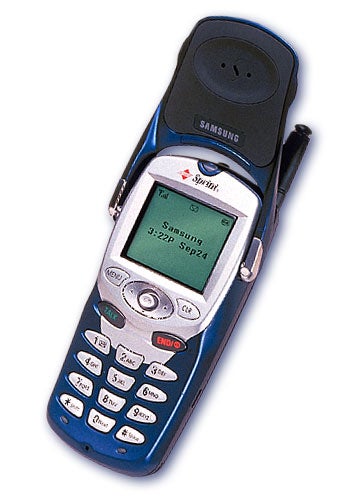
My first remotely cool-looking phone. Still monochrome screen. Wouldve been the MAN in 10th grade except no one at that age really cared about phones yet, especially compared to now.
_______________________________
Qualcomm / QCP-2760 / AMPS800, CDMA1900

First cell phone. Kicker: I was rockin AIM on this bitch. Yes, I know it was a 5-line LCD.
26 August 2009
Touchyfeely
Where the eff is this Mac tablet. That's all I care about. I'm such a jaded technonut when the only hardware that excites me anymore is Apple's, and thats only bc it's almost always radically different. Which humors me.
Seriously I know three people with HP 12" tablets and they all have serious heat dissipation problems. One even got so hot it burnt up the wireless card and now needs a dongle for wifi. That's sad. And I want to take notes in my engineering classes and be able to draw diagrams in my notes without having thousands of papers from classes I took all over my room. And without scanning.
Just hoping it doesnt look like a 10" square iPhone. 'Twould be lame.
Seriously I know three people with HP 12" tablets and they all have serious heat dissipation problems. One even got so hot it burnt up the wireless card and now needs a dongle for wifi. That's sad. And I want to take notes in my engineering classes and be able to draw diagrams in my notes without having thousands of papers from classes I took all over my room. And without scanning.
Just hoping it doesnt look like a 10" square iPhone. 'Twould be lame.
22 January 2008
"The Switch"...a month later. (w/ my Santa Rosa MacBook Pro)
So far, I'm not gonna lie...I made "the switch" and although it still feels weird, its not bad in many ways. Besides the Mac fanboys who think they're technical know-italls because they know the ins and outs of their little Maccy (sp?) world. (Whether or not you think Windows PCs are "inferior" you should still know how to use them. Why? Because they're everywhere. Don't be such a simpleton.)
Regardless here's the +'s & -'s of my MacBook Pro experience (incl. things that aren't Apple's fault). And yes they're very particular.
________________
Hardware & Other
-------------------
(+) Pluses
-------------
All in one package (Microphone, Bluetooth, iSight, Wireless is just THERE. (no labels advertising the features all over it like "BLUETOOTH 2.0 TECHNOLOGY" like Bluetooth is new)
RIGHTEOUS 3-D performance. GeForce 8600 (even the 128MB i got, not 256MB) ran Unreal 3 at full res 1440x900 with all the options on high without a hitch. This isn't even a cement-brick 'gaming' laptop!
Runs Windows natively. Huge selling point.
Ports, ports, ports. ExpressCard 34, USB 2, DVI dual-link, Gigabit, FireWire 400, FireWire 800, infrared, audio in & out.
Very bright screen + auto-lighting keys = nighttime code-hacking bliss.
Plays HD video so clear and hiccup-free its like you're at the movies.
Option for a matte screen (which i quickly took advantage of. Glossy-screen people: You can have your "stark contrast" because when you're trying to do something anywhere with significant lighting you're gonna be hating it.)
$200 education discount. (Tip: student discount > military discount)
Societal: Because you look like an "Apple fanboy" people don't really expect you to know anything. Anyone who's been in tech for a while knows this is a good thing more often than a bad thing.
Societal: Kid at the Apple store was just dead honest with me. Didn't try to force me to buy jack. No hassle, no spin doctory stuff (used to sell laptops retail and there's some shady dudes out there)
(-) Minuses
--------------
Fn key is on the outside. (Liked having CTRL there...fingers dont have to "look" for it)
NO HARD DRIVE ACTIVITY LIGHT. Drives me mad. (Might write a prog to reprog the Caps Lock light to be an HDD indicator in OS X.)
$2 extra to 'activate' 802.11n part of wireless card online
hard not to touch palms to HUGE trackpad while typing
No HDMI
so beautiful that every single oilmark is visible. Feel like i own a sports car, wiping it off with my shirt and scared it'll get ripped off)
user HD replacement voids warranty (only on Pro, not regular MacBook).
Don't like the noise the 'SuperDrive' makes when you insert a disc. Sounds like an old car cassette player.
3rd party: MSN Messenger on Mac OS X doesn't do video. Thats the only reason I even USE MSN.
Societal: Every Mac-only ignoramous thats actually dumber than rocks because they have little "real-world" computer experience but they wanna be nerds. Correction, 'geniuses'. How quaint.
Societal: People assume looking at you that you ARE one of those ignorant Mac-only fans.
__________________________
OS X & Software-specific
-----------------
(+) Pluses
----------
Things just...work. Especially in Mac OS X. No questions. No fiddling with new and old drivers.
love iChat. iLife in general. (iMovie, iPhoto, iDVD, iCal)
iCal can sync ("subscribe") to Google Calendar automatically. Its so convenient its sickening.
"Open With..." already knows which apps on the system can open your file of choice
Can speak the time aloud on the hour. (Useful when you're on a schedule and focused on something other than the time)
Speakers may not be super loud but they don't distort. Very crisp sounding.
Very stable. No driver issues.
(-) Minuses
-------------
No driver issues BECAUSE very little non-essential device compatibility (out of like 20 non-HID usb peripherals i have only 2 work) (bad/conflicting device drivers are usually what bring Windows crashing down first)
No program-independent acknowledgement of a compatible device connection (i.e. Handheld GPS)
Leopard: Very difficult to set up triple boot w/ Ubuntu! Between Tiger and Leopard, apparently Apple removed "Linux" as a file system type when partitioning the disk with their 'diskutil' terminal prog. Which happens to be the only util to safely partition the drive with (supposedly GParted isn't good with EFI manipulation or something)
Leopard iTunes: No matter how many times I tell OS X to always open my MP3s with VLC by default, it insists on opening iTunes instead (is this an iTunes setting?) and i have to manually "Open With..." every time.
----------------------------
All in all I'm very pleased with it. And also, to all you pussy Mac boys complaining about how "heavy" it is to "lug around" the Pro...lift some freaking weights. Its five and a half pounds. My mother goes walking with weights twice that heavy. And she's 55. And 'not skinny'.
Regardless here's the +'s & -'s of my MacBook Pro experience (incl. things that aren't Apple's fault). And yes they're very particular.
________________
Hardware & Other
-------------------
(+) Pluses
-------------
All in one package (Microphone, Bluetooth, iSight, Wireless is just THERE. (no labels advertising the features all over it like "BLUETOOTH 2.0 TECHNOLOGY" like Bluetooth is new)
RIGHTEOUS 3-D performance. GeForce 8600 (even the 128MB i got, not 256MB) ran Unreal 3 at full res 1440x900 with all the options on high without a hitch. This isn't even a cement-brick 'gaming' laptop!
Runs Windows natively. Huge selling point.
Ports, ports, ports. ExpressCard 34, USB 2, DVI dual-link, Gigabit, FireWire 400, FireWire 800, infrared, audio in & out.
Very bright screen + auto-lighting keys = nighttime code-hacking bliss.
Plays HD video so clear and hiccup-free its like you're at the movies.
Option for a matte screen (which i quickly took advantage of. Glossy-screen people: You can have your "stark contrast" because when you're trying to do something anywhere with significant lighting you're gonna be hating it.)
$200 education discount. (Tip: student discount > military discount)
Societal: Because you look like an "Apple fanboy" people don't really expect you to know anything. Anyone who's been in tech for a while knows this is a good thing more often than a bad thing.
Societal: Kid at the Apple store was just dead honest with me. Didn't try to force me to buy jack. No hassle, no spin doctory stuff (used to sell laptops retail and there's some shady dudes out there)
(-) Minuses
--------------
Fn key is on the outside. (Liked having CTRL there...fingers dont have to "look" for it)
NO HARD DRIVE ACTIVITY LIGHT. Drives me mad. (Might write a prog to reprog the Caps Lock light to be an HDD indicator in OS X.)
$2 extra to 'activate' 802.11n part of wireless card online
hard not to touch palms to HUGE trackpad while typing
No HDMI
so beautiful that every single oilmark is visible. Feel like i own a sports car, wiping it off with my shirt and scared it'll get ripped off)
user HD replacement voids warranty (only on Pro, not regular MacBook).
Don't like the noise the 'SuperDrive' makes when you insert a disc. Sounds like an old car cassette player.
3rd party: MSN Messenger on Mac OS X doesn't do video. Thats the only reason I even USE MSN.
Societal: Every Mac-only ignoramous thats actually dumber than rocks because they have little "real-world" computer experience but they wanna be nerds. Correction, 'geniuses'. How quaint.
Societal: People assume looking at you that you ARE one of those ignorant Mac-only fans.
__________________________
OS X & Software-specific
-----------------
(+) Pluses
----------
Things just...work. Especially in Mac OS X. No questions. No fiddling with new and old drivers.
love iChat. iLife in general. (iMovie, iPhoto, iDVD, iCal)
iCal can sync ("subscribe") to Google Calendar automatically. Its so convenient its sickening.
"Open With..." already knows which apps on the system can open your file of choice
Can speak the time aloud on the hour. (Useful when you're on a schedule and focused on something other than the time)
Speakers may not be super loud but they don't distort. Very crisp sounding.
Very stable. No driver issues.
(-) Minuses
-------------
No driver issues BECAUSE very little non-essential device compatibility (out of like 20 non-HID usb peripherals i have only 2 work) (bad/conflicting device drivers are usually what bring Windows crashing down first)
No program-independent acknowledgement of a compatible device connection (i.e. Handheld GPS)
Leopard: Very difficult to set up triple boot w/ Ubuntu! Between Tiger and Leopard, apparently Apple removed "Linux" as a file system type when partitioning the disk with their 'diskutil' terminal prog. Which happens to be the only util to safely partition the drive with (supposedly GParted isn't good with EFI manipulation or something)
Leopard iTunes: No matter how many times I tell OS X to always open my MP3s with VLC by default, it insists on opening iTunes instead (is this an iTunes setting?) and i have to manually "Open With..." every time.
----------------------------
All in all I'm very pleased with it. And also, to all you pussy Mac boys complaining about how "heavy" it is to "lug around" the Pro...lift some freaking weights. Its five and a half pounds. My mother goes walking with weights twice that heavy. And she's 55. And 'not skinny'.
09 January 2008
First blog - macbook pro v2 leopard tri-boot madness
OK so I finally made a blogger acct because, seeing as 95% of my friends aren't techno-dorks, it didn't make any sense to write about experiences (so that others can learn from them and it's not completely wasted time when something gets botched) in a myspace blog.
Anyways. quicklog: triplebooting macbook pro (2.2GHz, 2gb ram, 120gb hard drive)
used boot camp, added 32gb fat32 part for winxp pro
installed rEFIt (before or after windows i don't remember when?)
installed winxp pro
so far so good, (which means its not good enough though. :P)
tried to install ubuntu 7.10 x64. really annoying problems (no graphics during boot [only after], graphics resolution not working right, tried to set it right and it blanked out the screen until i hard-rebooted it. what an a-hole you are, x64.)
burnt and ran ubuntu 7.10 i686. muuuch better. (natively detected 1440x900 from the get-go)
install. (note: for 'advanced graphics' [probably referring to compiz/'beryl'] req. download of nVidia drivers, which req. inet connection)
deliberated over installing bootloader (grub). installed it anyways against my better judgement (note: major choice is merely a checkbox in an 'advanced...' type menu)
rebooted, osx works, yay.
rebooted, ubuntu works. (option-boot to 'windows' partition in mac efi loader, grub list pops up, pick ubuntu.)
rebooted, (rEFIt finally comes up? WTF? only now that there's 3 OS's it decides to work?) winxp w...ill probably end up broken. which sure as the crow flies south, it was. (missing or corrupt hal.dll file)
did some research. people have success (no mention of tri-boot though) wiping out win partition and re-doing it with NTFS. i was originally going to use ntfs and not fat32 but being able to write the winxp partition straight from osx was pretty tempting. very convenient.)
Tried to use boot camp assistant to restore back to a sole os x partition and have another go at it, but turns out boot camp won't touch it unless its either a osx-only or bootcamp-orthodox osx/xp setup. (at this point there's 5 partitions: mac os x efi, mac os x, win xp, linux, linux swap)
tried disk utility. disk utility will erase THE INSIDES whichever one i want. it
will burn to CD/DVD THE INSIDES (read 'data') of whichever partition i want. and
yet it can't actually remove or add a partition. Awesome, thanks so much.
Now my choices are:
a.) boot into OSX, remove rEFIt, and see if that lets bootcamp re-do the setup
b.) use the EFI-based fdisk tool via rEFIt to remove the offending partitions
c.) (back up personal data first) see if apple extended hardware diagnostic (an hour...sigh) detects awkward setup as a problem (as boot camp did...great engineers usually think alike) and offers to fix it
d.) (back up personal data first) boot off leopard CD and try and 'restore' things (last resort: wipe it clean with said CD)
Like I said, one of the benefits of trial-and-error is learning, and why keep it to myself? Hope this helps some people who might read this before going about it the wrong way.
Eventually I will figure out a cut-and-dry method to do this, so help me God.
Anyways. quicklog: triplebooting macbook pro (2.2GHz, 2gb ram, 120gb hard drive)
used boot camp, added 32gb fat32 part for winxp pro
installed rEFIt (before or after windows i don't remember when?)
installed winxp pro
so far so good, (which means its not good enough though. :P)
tried to install ubuntu 7.10 x64. really annoying problems (no graphics during boot [only after], graphics resolution not working right, tried to set it right and it blanked out the screen until i hard-rebooted it. what an a-hole you are, x64.)
burnt and ran ubuntu 7.10 i686. muuuch better. (natively detected 1440x900 from the get-go)
install. (note: for 'advanced graphics' [probably referring to compiz/'beryl'] req. download of nVidia drivers, which req. inet connection)
deliberated over installing bootloader (grub). installed it anyways against my better judgement (note: major choice is merely a checkbox in an 'advanced...' type menu)
rebooted, osx works, yay.
rebooted, ubuntu works. (option-boot to 'windows' partition in mac efi loader, grub list pops up, pick ubuntu.)
rebooted, (rEFIt finally comes up? WTF? only now that there's 3 OS's it decides to work?) winxp w...ill probably end up broken. which sure as the crow flies south, it was. (missing or corrupt hal.dll file)
did some research. people have success (no mention of tri-boot though) wiping out win partition and re-doing it with NTFS. i was originally going to use ntfs and not fat32 but being able to write the winxp partition straight from osx was pretty tempting. very convenient.)
Tried to use boot camp assistant to restore back to a sole os x partition and have another go at it, but turns out boot camp won't touch it unless its either a osx-only or bootcamp-orthodox osx/xp setup. (at this point there's 5 partitions: mac os x efi, mac os x, win xp, linux, linux swap)
tried disk utility. disk utility will erase THE INSIDES whichever one i want. it
will burn to CD/DVD THE INSIDES (read 'data') of whichever partition i want. and
yet it can't actually remove or add a partition. Awesome, thanks so much.
Now my choices are:
a.) boot into OSX, remove rEFIt, and see if that lets bootcamp re-do the setup
b.) use the EFI-based fdisk tool via rEFIt to remove the offending partitions
c.) (back up personal data first) see if apple extended hardware diagnostic (an hour...sigh) detects awkward setup as a problem (as boot camp did...great engineers usually think alike) and offers to fix it
d.) (back up personal data first) boot off leopard CD and try and 'restore' things (last resort: wipe it clean with said CD)
Like I said, one of the benefits of trial-and-error is learning, and why keep it to myself? Hope this helps some people who might read this before going about it the wrong way.
Eventually I will figure out a cut-and-dry method to do this, so help me God.
Subscribe to:
Posts (Atom)